Why choose StoreLinkr?
PIM system for webshops and marketplaces
A PIM system (product information management) is where you record your product data properly once and from where you send it to every sales channel. For a webshop that also sells on marketplaces, or a wholesaler with thousands of items from dozens of suppliers, it is the difference between correct, consistent product information everywhere and making the same change in five systems. StoreLinkr combines a PIM with the connections to your webshop, marketplaces and product feeds. You manage, enrich and check your products in one place, and StoreLinkr keeps the channels up to date.
What a PIM system does for your webshop
Without a PIM, product information is scattered: a supplier price list in Excel, photos in a folder, descriptions in the webshop and stock in the POS system. Every marketplace then asks for different fields and categories. A PIM system brings that together in one catalogue that serves as the source for all your channels. What you change there goes to every connected channel. Looking for the short definition first? Read what is a PIM system. This page covers what the StoreLinkr PIM actually does, who it suits and when another system is a better fit.
Which product data you manage in the PIM
A product in StoreLinkr is more than a title and a price. For each product you record, among other things:
- Core data: name, short and long description, brand, model, SKU, EAN and extra barcodes.
- Prices: sales price, promotional price, purchase price and recommended retail price, plus the VAT rate.
- Logistics: weight, dimensions and the dispatch or delivery time.
- Condition: new, as new, refurbished or good, with its own description. Useful if you also sell used or refurbished items.
- Characteristics: attributes (facets such as colour, size or material), pros and cons, and metafields of several types: text, HTML, number, date, colour, URL, table, JSON and more.
- Relations: cross-sell, upsell, accessories, similar and alternative products.
- Variants: sizes and colours of the same product are grouped automatically.
- Images and files: drag-and-drop image upload, image order and alt text, plus attachments such as manuals or data sheets.
- Categories: your own category tree, arranged with drag and drop.
A home goods webshop might use attributes for material and colour, a metafield for care instructions and relations to show matching candle holders next to a vase. A bike parts wholesaler puts the weight on EAN, brand, model, extra barcodes and technical metafields, such as fitting dimensions in a table.
Sources: suppliers, POS and one-off imports
Most products do not start in the PIM but with a supplier. StoreLinkr has connections with suppliers, wholesalers and POS systems that import products and keep them up to date. Next to that, you create your own PIM products for items that do not come from any other source.
- Import connections pull products from wholesalers, suppliers, POS systems and webshops.
- One-off import of an XLS, XLSX or CSV file, with column mapping and a preview before you import. Handy for a new supplier's price list or moving away from a spreadsheet.
- Product rules override imported fields per product: name, brand, model, short and long description, SKU, prices and category. The next import leaves your version in place.
- Find and replace rules per import source adjust supplier texts automatically, for example to remove a stock sentence or correct a misspelt brand name.
- Convert to a PIM product: if you want to manage an imported product fully yourself, one action turns it into your own PIM product.
That way you combine the convenience of automatic supplier data with the control of your own catalogue. The bike parts wholesaler lets the supplier's prices and stock flow in, but keeps its own titles and its own category with product rules.
Enrichment and data quality
Supplier data is often thin: a title, an EAN and a price. StoreLinkr enriches products from the EAN with data from the product catalogue, with Google Books for books, and with your own AI (OpenAI, Claude or Gemini) using your own key. How that works and how you stay in control is explained on the AI product enrichment page.
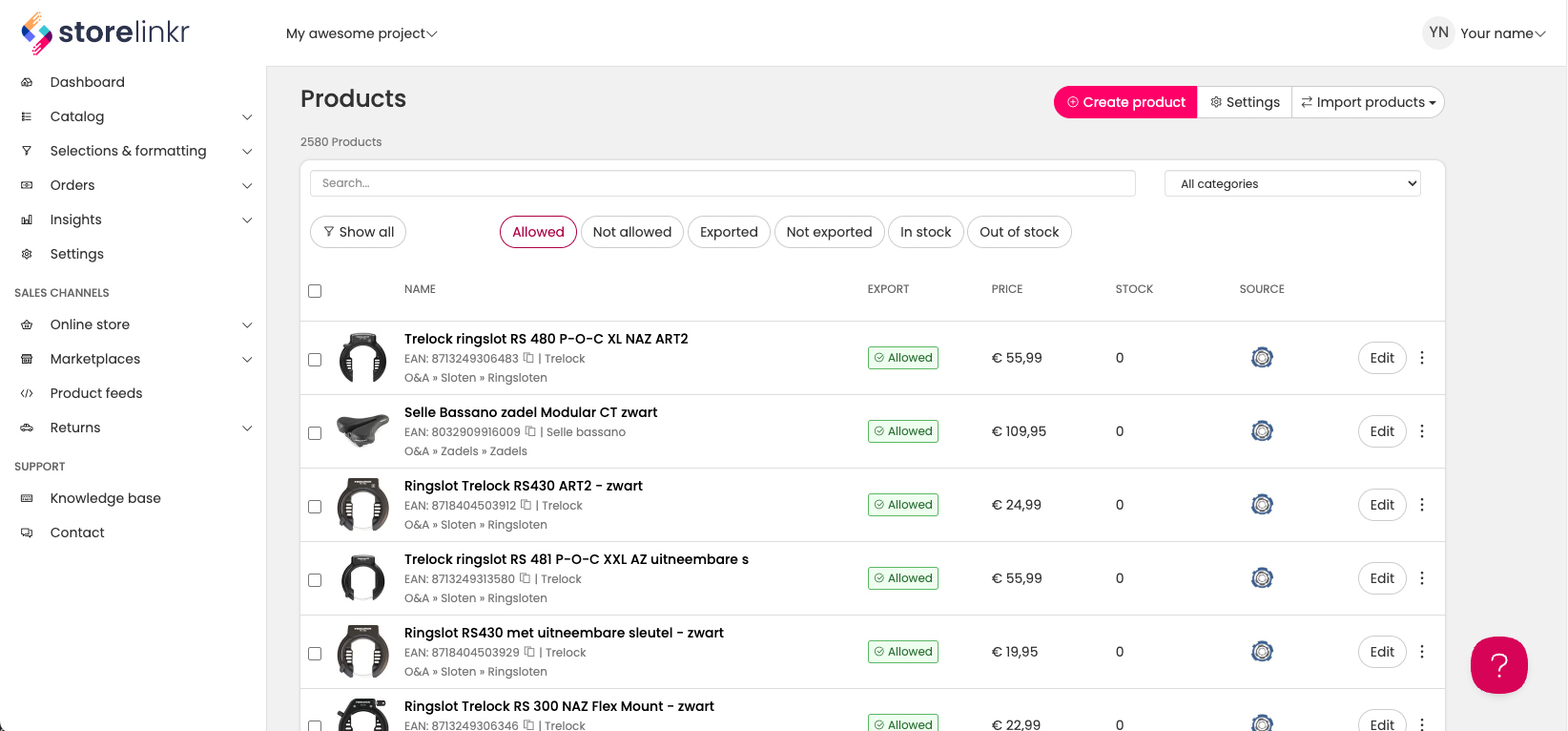
The data quality dashboard shows where your catalogue falls short. It flags products with no or few images, invalid EANs, low margins, a missing brand, category, description, dimensions, attributes, model, prices, SKU or weight, and products without stock. From the product overview you then work through that list: edit inline in the table, or in bulk change the internal reference, SKU or category, allow or block export to channels, enrich and delete products.
Channels: webshops, marketplaces and product feeds
From the PIM, your products go to:
- Webshops: WooCommerce (through a WordPress plugin), Shopify, SitePack, CCV Shop, Lightspeed C-Series and R-Series, and HikaShop.
- Marketplaces: Bol, Kaufland and marketplaces that run on Mirakl. Allegro, eBay, Books in Belgium and Boekwinkeltjes are in beta.
- Product feeds: Google Shopping, Meta, Microsoft Ads and TikTok.
For each channel connection you set three things: which products go there, which price list applies (with country and currency) and which stock locations the stock comes from. Titles for feeds and marketplaces are composed from brand, model, title, EAN, SKU and category, so a listing can start with brand and model, for example. You map your own categories to each channel's categories, and for marketplaces you also map the categories and attributes they require.
What it does not do: descriptions are the same on every channel, and StoreLinkr does not manage translated product content per language. If you sell in several countries with separate copy per language, that is a reason to look at an enterprise PIM.
Connecting the PIM to WooCommerce, Shopify or SitePack
You manage your products in StoreLinkr and export them to your webshop. WooCommerce has an official plugin, Shopify connects through a custom app and SitePack connects without API keys. Read more about all options under connect your webshop, and find the full list on the integrations page.
Stock and orders in the same system
A classic PIM system only manages product information. StoreLinkr is a PIM and an integration platform in one. You work with multiple stock locations, stock per location and a stock log, and stock is pushed to your channels. Extra stock locations are a paid add-on. Orders from your marketplaces come back into one overview, so you do not have to log in to every channel separately and stock stays correct everywhere.
GPSR, trade brands and economic operators
Because of the EU General Product Safety Regulation (GPSR), marketplaces ask for the details of the responsible economic operator. In StoreLinkr you record economic operators with name, address, email address and phone number and match them to products, for example by brand. Marketplaces that ask for them, such as Kaufland and eBay, receive those details automatically. You can also record trade brands, so your own brands and your suppliers' brands stay apart.
API and working together
With the public API v2 you work with catalogue, categories, variants, stock and orders, using API keys that you limit to the parts an application needs. You can invite colleagues to your account. There are no roles or permissions per user.
How it works in practice
Take a home goods webshop that adds a new supplier. This is how that goes in StoreLinkr:
- The supplier's price list arrives as a CSV file. You map the columns to the fields in StoreLinkr, check the preview and import.
- The new products are enriched from the EAN with descriptions, attributes, images, weight and dimensions.
- The data quality dashboard shows which products still lack a category or have too few images. You fill those gaps in bulk or per product.
- Per channel you decide whether the new products go along: the whole range to your own webshop, only the bestsellers to Bol and a selection to the Google Shopping feed.
- From then on stock and price changes follow automatically, and marketplace orders arrive in your order overview.
Who is the StoreLinkr PIM for?
StoreLinkr suits webshops, wholesalers and retailers that want product data, enrichment and the connections to their webshop and marketplaces in one tool. It fits if you combine products from several suppliers, sell on one or more marketplaces and lose most of your time retyping and maintaining product information.
An enterprise PIM such as Akeneo, Pimcore, inRiver, Stibo or Salsify is a better fit for large brands and manufacturers with a complex data model, translations into many languages, their own DAM and approval workflows. What StoreLinkr does not do:
- no separate DAM or media library, only product images and attachments;
- no export of PIM data to CSV or Excel;
- no roles or permissions per user;
- no different description per channel and no translated content per language;
- no connection with Magento, Shopware, Odoo or Business Central.
If one of these points is a deal breaker for you, it is better to know now than after an implementation.
What does the StoreLinkr PIM cost?
StoreLinkr works with subscriptions from €69 per month. The price grows with the number of orders per month: the entry plan, Pico, covers up to 75 orders a month, and larger plans exist for shops with more orders. You can try StoreLinkr first. All plans are on the pricing page. How the cost of PIM systems is built up in general is covered in what PIM software costs.
Further reading on PIM systems
Not sure whether you need a PIM or an ERP? Read PIM vs ERP. If you are comparing vendors, best PIM software helps you set the criteria. What a PIM brings to an online shop specifically is in PIM for ecommerce. Budget is the topic of PIM software cost, and how to plan the switch is in PIM implementation. What good product data management takes day to day is covered in product data management.
One catalogue
Your own PIM products next to supplier and POS data, with product rules that keep your changes.
Data quality in view
The dashboard shows missing images, invalid EANs, empty fields and low margins.
Control per channel
For each webshop, marketplace or feed you set the products, the price list and the stock locations.
Frequently Asked Questions
Everything you need to know about the StoreLinkr PIM system.